
AI batch photo editing is the process of automatically analyzing and enhancing multiple photos at once using machine learning models that understand image content and context. The industry term for this is automated image processing, and it covers everything from noise reduction to sky replacement across hundreds of files simultaneously. Modern platforms support 50–500 images in a single upload, making large-scale production practical for photographers and content creators who cannot afford to edit every frame by hand. The standard workflow follows seven distinct steps: upload, define settings, run a test batch, review results, adjust settings, process the full batch, and do a final quality review. Understanding each step tells you exactly where time is saved and where human judgment still matters.
How AI batch photo editing works under the hood
Traditional photo filters apply the same math to every pixel regardless of what is in the frame. AI batch editing works differently. Modern AI models treat images as objects, recognizing faces, clothing, windows, and backgrounds rather than just patterns of color values. That semantic awareness lets the AI repair a face without blurring the wall behind it, or brighten a window without washing out the furniture in front of it.
The technology behind this falls into a few key categories:
- Denoising: The model identifies grain patterns and separates them from actual texture, removing noise while keeping fine detail like fabric weave or hair strands.
- Inpainting: The AI fills in missing or damaged areas by referencing surrounding pixels and its training data to generate plausible replacements.
- Upscaling with GANs: Generative adversarial networks reconstruct high-resolution detail rather than simply stretching pixels. A GAN trained on millions of image pairs can hallucinate a convincing eyelash or brick mortar line that was not visible in the original.
- Face restoration: Dedicated sub-models detect facial landmarks and apply targeted sharpening and smoothing only to skin, eyes, and lips.
- Color correction: The model reads white balance, exposure, and tonal range across the whole image and adjusts to match a target profile or learned style.
Older platforms chained several narrow networks together, passing the image from one specialist model to the next. The problem with that approach is error compounding. Each model introduces small artifacts, and those artifacts stack up by the final step. Newer frontier models analyze the entire image at once, cross-referencing lighting, depth, and texture in a single pass. The result is cleaner output with fewer visible seams between edited and unedited areas.
Pro Tip: If you are evaluating an AI editing platform, ask whether it uses a single unified model or a pipeline of separate networks. Single-model architectures consistently produce fewer artifacts on complex scenes like interiors with mixed lighting.

What does a typical AI batch editing workflow look like?
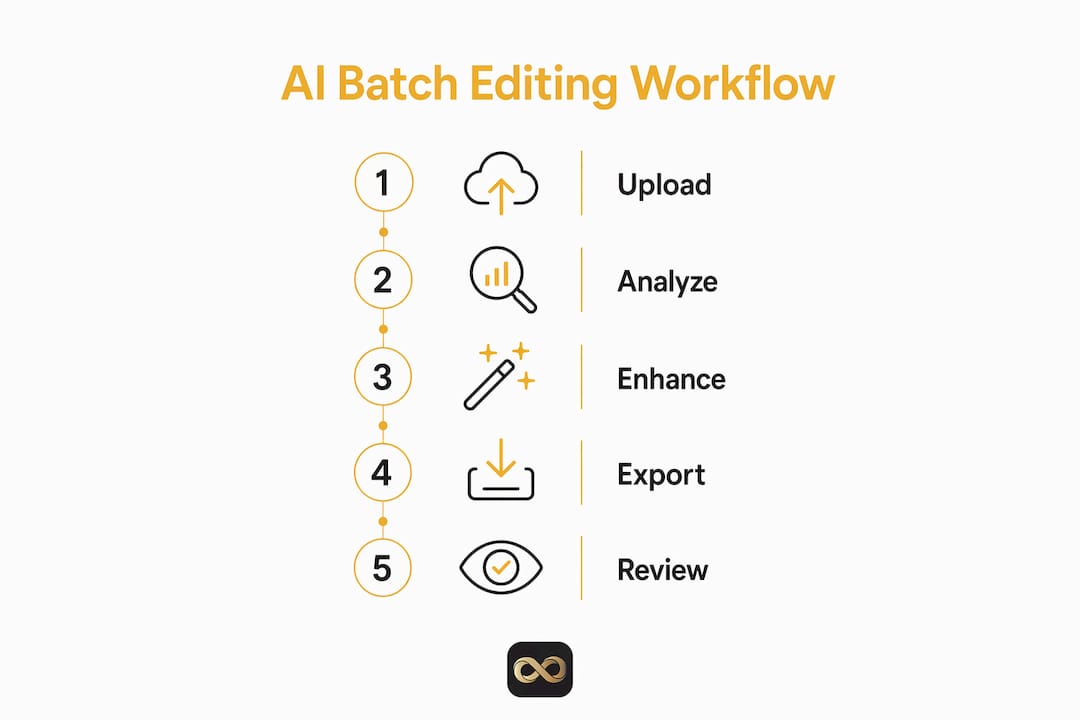
The seven-step process is not just a checklist. Each step exists because skipping it creates a specific problem downstream.
- Upload your batch. Drag and drop your files into the platform. Most tools accept RAW, JPEG, and TIFF formats. Stick to batches of 50–500 images for stable performance.
- Define your editing settings. Choose a preset style, upload a reference image, or let the AI learn from a sample of your previous edits. This step sets the tone and color target for the entire batch.
- Run a small test batch. Process 5–10 images first. This costs almost no time and reveals whether your settings produce the look you want before committing to hundreds of files.
- Review the test results. Check for color casts, over-sharpening, or unnatural skin tones. Pay attention to edge cases like backlit windows or very dark rooms.
- Adjust your settings. Dial back any aggressive corrections. If the AI is over-brightening shadows, reduce the exposure target slightly before the full run.
- Process the full batch. Submit all remaining images. 200 images typically process in 2–3 minutes on current platforms. That speed makes same-day delivery realistic for professional photographers.
- Final quality review. Scan the output for outliers. Flag any images that need manual attention and handle those separately.
Pro Tip: Always export your originals to a separate folder before processing. Non-destructive editing preserves your RAW files and gives you a clean fallback if the AI output misses the mark on any image.
Real estate photographers and Airbnb hosts benefit especially from this workflow. Seasonal updates, where you reshoot a property for spring or fall listings, produce large batches of similar images that are perfect for automated processing. The consistency AI delivers across 80 nearly identical room shots is something manual editing simply cannot match at that speed.
What are the real benefits and limits of AI batch editing?
AI batch editing delivers three concrete advantages: speed, consistency, and scalability. The speed gain is the most dramatic. Processing 200 images in 2–3 minutes versus spending 5–10 minutes per image manually is not a marginal improvement. It changes what is possible in a single workday.
Consistency is the less obvious but equally valuable benefit. When you edit manually across a large set, fatigue shifts your color judgment by the 50th image. AI applies the same correction logic to image 1 and image 200 without drift. For real estate listings, where buyers compare multiple photos side by side, that visual consistency builds trust.
The limits are real, though. The best results come from combining AI automation with human review. That finding holds across ecommerce, portrait, and architectural photography. AI handles the repetitive corrections well. It struggles with complex artistic choices, unusual lighting scenarios, and repairs that require contextual judgment a model has not seen in training.
Two common pitfalls trip up photographers who are new to batch automation:
- Wrong processing order: Upscaling before repairing damage causes the AI to treat flaws as fine detail, magnifying scratches and noise instead of removing them. Always repair first, then upscale.
- Oversized batches: Batches over 1,000 RAW images push most platforms to their memory limits and cause crashes or corrupted exports. Split large jobs into manageable chunks.
The hybrid approach works best. Use AI to handle the bulk of corrections, then spend your manual editing time on the 5–10% of images that need a human eye.
How to get the best results from AI batch photo editing
Getting great output from automated editing is less about the tool and more about how you prepare your files and structure your workflow.
- Start with clean RAW files. AI healing algorithms read natural RAW textures to match repairs. Processed JPEGs introduce compression artifacts that confuse the model and reduce repair accuracy.
- Never apply color grades before AI healing. Healing algorithms work more accurately on ungraded RAW data because they have cleaner reference tones. Color grade after all repairs are complete.
- Use separate workflows for separate tasks. Run background removal, portrait enhancement, noise reduction, and upscaling as distinct passes rather than stacking them in one job. This gives you control over each stage and makes it easier to spot problems.
- Adjust AI mask thresholds. Most platforms let you set how aggressively the AI selects areas for correction. A tighter threshold on sky selection, for example, prevents the model from accidentally editing window frames or rooflines.
- Keep batches under 500 images per run for consistent performance. Split larger shoots into logical groups, such as by room type or lighting condition, which also makes the final review faster.
Pro Tip: For portrait-heavy batches, run face restoration as a separate final pass after all other corrections. Applying it mid-pipeline means subsequent adjustments can undo the facial detail the model worked to recover.
Photographers listing properties on platforms like Airbnb get particular value from this discipline. A seasonal reshoot of 10 properties, each with 20 rooms, produces 200 images that share similar lighting and color challenges. A well-structured batch workflow turns that volume into a same-day delivery rather than a two-day editing marathon. Platforms like Proofe offer AI photo enhancement built specifically for this kind of high-volume real estate and rental photography.
Key Takeaways
AI batch photo editing delivers professional results at scale when photographers follow the correct processing order and combine automation with targeted manual review.
| Point | Details |
|---|---|
| Semantic awareness drives quality | AI models recognize objects and depth, not just pixels, producing repairs that respect lighting and texture. |
| Seven-step workflow is the standard | Upload, test, review, adjust, process, and review again to catch errors before they multiply across hundreds of files. |
| Order of operations matters | Always repair and clean images before upscaling; reversing this order magnifies flaws instead of fixing them. |
| Speed gain is substantial | Current platforms process 200 images in 2–3 minutes, making same-day delivery realistic for professional shoots. |
| Hybrid approach wins | AI handles volume and consistency; human review catches the 5–10% of images that need artistic judgment. |
What I've learned from watching AI batch editing mature
I have watched photographers go from skeptical to fully converted on AI batch editing, and the shift usually happens the first time they deliver a 150-image real estate shoot in an afternoon instead of two days. The time argument wins fast.
What takes longer to internalize is the change in creative role. The photographer's job does not disappear. It shifts. You spend less time on repetitive corrections and more time on the decisions that actually require taste: which images to include, how to sequence them, and where the AI's output needs a human touch. That is a better use of skill.
The photographers who get the most out of batch automation are the ones who treat it as a first pass, not a final product. They run the AI, review the output critically, and fix the outliers manually. The ones who skip the review step are the ones who send clients images with over-brightened ceilings or skin tones that look slightly off. The tool is only as good as the process around it.
The technology is also moving fast. Single-model architectures that analyze an entire image at once are producing noticeably cleaner results than the pipeline tools of two years ago. If you tried AI batch editing in 2023 and found the artifacts unacceptable, the current generation is worth another look. The gap between AI output and manual editing has narrowed significantly, especially for real estate and rental photography where the subject matter is consistent and well-represented in training data.
For high-stakes projects, such as a luxury listing or a portfolio shoot, I still recommend finishing with a manual pass. But for standard volume work, the hybrid workflow is the professional standard now, not the exception.
— Richard Lopez
AI photo editing built for real estate photographers
Real estate agents, property managers, and Airbnb hosts deal with exactly the kind of high-volume, deadline-driven photography that AI batch editing was built for. Proofe takes that further by putting the entire workflow on your phone.

You shoot the listing with your smartphone, Proofe's AI enhancement runs automatically, and you download MLS-ready files the same day. No expensive camera gear. No editing software to learn. Features like bright room edits, object removal, and sky replacement are built into the process. The first five photos are free, so you can see the output quality before committing. For agents managing multiple listings or hosts refreshing seasonal photos, Proofe's listing photo editing service turns a two-day editing job into a same-day turnaround.
FAQ
How does AI batch photo editing differ from basic filters?
AI batch editing uses semantic awareness to recognize objects like faces, windows, and backgrounds, then applies targeted corrections to each. Basic filters apply the same math to every pixel regardless of content.
How many photos can AI batch editing handle at once?
Most current platforms support batches of 50–500 images per upload. Professionals working with larger shoots split jobs into smaller groups to prevent system crashes and maintain output quality.
What is the correct order of operations in AI batch editing?
Always repair and denoise images before upscaling. Upscaling first causes the AI to treat damage as fine detail, which magnifies flaws rather than removing them.
Can AI batch editing replace manual photo editing entirely?
AI handles volume corrections well, but the best professional results come from combining automation with human review. Manual touch-ups on the 5–10% of outlier images remain standard practice.
Is AI batch photo editing useful for Airbnb and rental listings?
Yes. Seasonal reshoots produce large batches of similar images that are ideal for automated processing. AI delivers consistent color and exposure across all rooms, which makes listings look polished and helps attract more bookings.