
The role of first impressions in listings is simple and unforgiving: the buyer either clicks or scrolls past, and that decision happens before they read a single word of your description. Your hero photo, the first three gallery images, your headline, and your curb appeal at arrival are the four elements that control whether a buyer schedules a showing or moves on to the next property.
The highest-impact elements to get right, in order of priority:
- Hero image: the single photo that appears in search thumbnails and at the top of your gallery
- First three photos: the sequence buyers scan before deciding to keep scrolling
- Lighting and composition: bright, straight, and uncluttered reads as "move-in ready"
- Headline and price framing: the text that frames the images before buyers form a verbal opinion
- Curb appeal and entry condition: the in-person confirmation of what the photos promised
The tactical rule is this: if your first online image does not force a click, you have already lost that buyer.
Key Takeaways
The hero image is the single highest-leverage element in any listing: it controls clicks, sets buyer attitude, and determines whether a showing ever happens.
| Point | Details |
|---|---|
| Hero image drives the click | Your first photo appears in search thumbnails; it must compel a click within 2–5 seconds—buyers spend about 2–5 seconds on each listing according to industry coverage—or the buyer moves on. |
| Stage and prep before photos | Complete all curb-appeal and interior staging before the camera comes out; photos are the first showing. |
| Photo order shapes the story | Sequence your gallery: hero, kitchen, primary bedroom, living areas, exterior, floorplan for maximum impact. |
| Measure CTR and showings | Track click-through rate and showing requests before and after any photo change to confirm what works in your market. |
| Proofe delivers same-day edits | Upload smartphone photos to Proofe and receive MLS-ready, AI-enhanced files the same day, with the first five photos free. |
Table of Contents
- Why do first impressions shape everything buyers think about a listing?
- Where do buyers actually form their first impression of a home?
- How do you make your listing photos compel clicks and showings?
- How do you make curb appeal and staging confirm the online promise?
- What listing mistakes cost you the most showings?
- What does it cost to prepare a listing, and how long does it take?
- How do you measure whether your first-impression fixes actually worked?
- How a focused photo workflow improves clicks and showings
- The online hero image is the decision that matters most
- Your listing photos, professionally edited the same day.
- Sources
Why do first impressions shape everything buyers think about a listing?
Buyers do not evaluate listings neutrally. They form an attitude in the first few seconds, and that attitude colors every piece of information they encounter afterward. According to industry coverage citing NAR data, the vast majority of buyers begin their home search online—according to NAR data, 97% start online—and they form first impressions from listing photos very quickly, often within 2–5 seconds on scroll-driven platforms. That is not enough time to read a description. It is barely enough time to register a feeling.
Three psychological mechanisms explain why that feeling sticks:
The halo effect means a bright, well-composed hero photo makes buyers assume the home is well-maintained, fairly priced, and worth visiting. The reverse is equally true. Behavioral science research confirms that people rely heavily on initial information and interpret everything that follows through that first lens.
Anchoring sets the reference point. A buyer who sees a dark, cluttered photo enters the showing expecting to negotiate hard. A buyer who sees a polished, bright image enters expecting to justify the asking price. The photo does not just attract clicks; it sets the negotiating posture before anyone walks through the door.
Confirmation bias locks the first impression in place. Preregistered experimental and meta-analytic research shows that first impressions produce sustained, additive effects on trust and evaluation that persist over time. Buyers who formed a positive first impression from photos tend to notice the home's strengths during a showing. Buyers who formed a negative one tend to notice problems.
The practical implications for listings are direct. A poor hero photo does not just reduce clicks; it creates a discount mindset that follows the buyer into the showing and the offer. A great hero photo creates emotional justification for the price before the buyer has seen a single room.
Staged listings illustrate the financial stakes. NAR-sourced industry reporting finds that staged homes can spend significantly less time on market compared with comparable non-staged properties. That gap is not explained by staging alone. It is explained by the combination of better physical presentation and the stronger first impression that presentation produces online.
Where do buyers actually form their first impression of a home?
The first showing is online. Most buyers never visit a property they did not first approve in a 2–5 second scroll. Marketing analysis of online browsing behavior finds that buyers ask four rapid questions when they land on a listing: Is it inviting? Does it look maintained? Is it livable? Is it worth learning more? Your photos have to answer all four before the buyer consciously processes them.
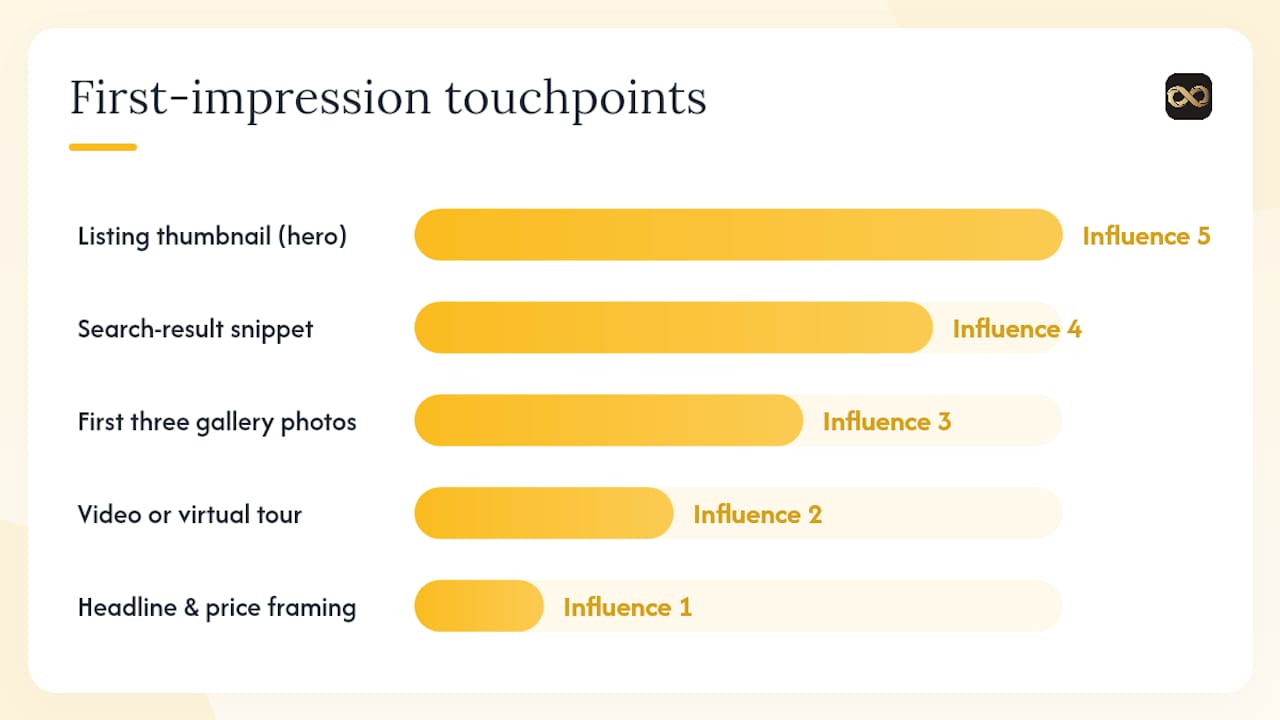
The touchpoints that create first impressions, in order of influence:
- Listing thumbnail/hero image: the image that appears in search results and map views; the only image most buyers see before deciding to click
- Search-result snippet: headline, price, and bed/bath count visible without clicking
- First three gallery photos: the sequence that confirms or kills the click decision
- Video or virtual tour: the immersive layer that converts interest into a showing request
- Headline and price framing: the verbal anchor that follows the visual impression
- Curb appeal and entry at arrival: the in-person moment that confirms or contradicts the online promise
- The showing experience: the room-by-room walk that either deepens or deflates the attitude formed online
The buyer flow looks like this: search results → scroll → hero image triggers a click → gallery confirms interest → description and price get read → showing is requested → in-person visit either validates or undermines the expectation. Every step after the hero image is contingent on the step before it. Fix the bottleneck that is blocking buyers from reaching the showing, and you fix the funnel.
Pro Tip: Check your listing on a mobile device in thumbnail view. If you cannot identify the room or feel a pull to click within two seconds, your hero image needs to change.
How do you make your listing photos compel clicks and showings?
Start with the hero image. It is the single highest-leverage decision in your entire listing presentation. Zillow's engineering team has run A/B tests and built deep-learning models specifically to identify which hero images drive higher click-through rates, because the difference between a good and a poor hero image is measurable in engagement and contact rates. You do not need a machine-learning model to make a better choice, but you do need to treat it as a marketing decision, not an afterthought.
Photo order: the sequence that sells
After the hero, the order of your gallery matters more than the total number of photos. A recommended sequence:
Hero image: the room or angle that best represents the home's strongest feature. For most properties, this is the living room or a dramatic exterior shot with good light. For a condo, it might be a kitchen with a view.
Kitchen: buyers rank kitchens as the highest-priority room in purchase decisions. Put it second.
Primary bedroom: the second room buyers evaluate emotionally. It should feel spacious and calm.
Additional living areas and bathrooms: support the story the first three images started.
Exterior and neighborhood context: confirm curb appeal and location. Neighborhood context photos help buyers visualize the lifestyle, not just the structure.
Floorplan or virtual tour link: the logical close for buyers who are already interested.
Image quality checklist
Before uploading anything to the MLS, run through these checks:
- Brightness and exposure: every room should look naturally lit, not washed out or shadowy
- Lens distortion: correct barrel distortion from wide-angle lenses so walls look straight
- Horizontal lines: countertops, window frames, and door frames should be level
- Clutter: remove everything that does not belong in a magazine photo
- Crop for thumbnail: MLS aspect ratio conventions mean vertical photos fail; shoot and crop horizontal
Shooting tips for phone users
You do not need a DSLR to get usable listing photos. Shoot between 9 AM and 11 AM or 3 PM and 5 PM when natural light is soft and directional. Brace your phone against a wall or use a small tripod to eliminate camera shake. Use your phone's wide-angle lens cautiously; extreme wide-angle distorts rooms and makes them look smaller on screen. For windows, use the HDR mode or plan for a window-pull edit so the view does not blow out to white. A full smartphone shooting workflow can produce gallery-ready images when the light and staging are right.
Pro Tip: Test two different hero images by checking how each looks as a thumbnail at 200 pixels wide. The one that reads clearly at small size will perform better in search results.
An empirical study of photo layout on a major rental platform found that adopting an optimal photo layout increased bookings by a notable margin. The cover image had the largest individual impact. That finding translates directly to residential listings: the hero image is not decoration; it is a conversion lever.
How do you make curb appeal and staging confirm the online promise?
Do all staging and curb-appeal work before photos are taken. Shooting a staged home is not the same as staging a home after photos. The photos are what buyers see first, so the physical preparation has to be complete before the camera comes out.
Curb appeal checklist:
- Mow, edge, and remove dead plants or debris from the lawn
- Touch up front door paint and replace worn hardware
- Power-wash the driveway, walkway, and porch
- Stage the porch with one or two simple elements: a clean mat, a potted plant, or a chair
- Remove all cars from the driveway and street in front of the home
- Trim any overgrowth that blocks the facade or windows
Entry and interior quick wins:
- Clear all countertops to a maximum of two or three decorative items
- Remove personal photos, children's artwork, and anything that makes the home feel occupied by a specific family
- Add a simple lamp to any room that feels dark; warm light reads better on camera than overhead fluorescents
- Place a neutral rug at the entry and a single plant in the main living area
- Fix any visible maintenance items: a dripping faucet, a cracked outlet cover, a scuffed baseboard
Timeline by effort level:
- Same day: declutter, clean, remove personal items, fix small visible repairs
- One weekend: curb-appeal work, touch-up painting, furniture rearrangement
- One to two weeks: professional staging, significant repairs, landscaping upgrades
Airbnb hosts and short-term rental operators should treat seasonal photo retakes as a standard part of their calendar. A property photographed in summer looks dated by November. Fresh exterior shots in fall or winter, with seasonal staging accents, can meaningfully improve booking rates during slower periods. Exterior shot guidance for rental listings covers the specific angles and seasonal considerations that matter most for short-term rental platforms. For a broader look at rental-specific photo standards, rental listing photo best practices covers the full workflow.
What listing mistakes cost you the most showings?
These errors are common, fixable, and expensive. Each one costs you showings before a single buyer walks through the door.
- Dark or underexposed photos: the most frequent mistake. Buyers read dark photos as "poorly maintained." Re-shoot with better natural light or use bright room edits to correct exposure without misrepresenting the space.
- Cluttered rooms: personal items, excess furniture, and visible storage make rooms look smaller and distract from the space. Remove before shooting, not after.
- Wrong hero image: using a bathroom, a utility room, or a dark hallway as the first photo is a common error. The hero must be the home's strongest room at its best angle.
- Misleading edits: academic research on listing signals confirms that inconsistency between photos and descriptions reduces listing credibility and harms buyer inference. Enhance clarity and brightness; do not fabricate features or remove structural elements.
- Ignoring mobile thumbnail crop: a photo that looks fine on desktop can crop to a wall or a ceiling on mobile. Check every hero image in thumbnail view on a phone before publishing.
- Poor headline and price framing: the text that accompanies your photos either reinforces or undercuts the visual impression. A headline that highlights a specific feature ("Renovated kitchen, private backyard") performs better than a generic one ("Beautiful home, must see").
The ethical line on editing is clear: correct exposure, color, and lens distortion; remove temporary clutter; replace a gray sky with a realistic blue sky. Do not remove permanent structures, add square footage, or stage rooms that do not exist. A literature review on first impressions from photos confirms that buyers form rapid, stable judgments from images. When the in-person visit contradicts those judgments, trust collapses and deals fall apart.
What does it cost to prepare a listing, and how long does it take?
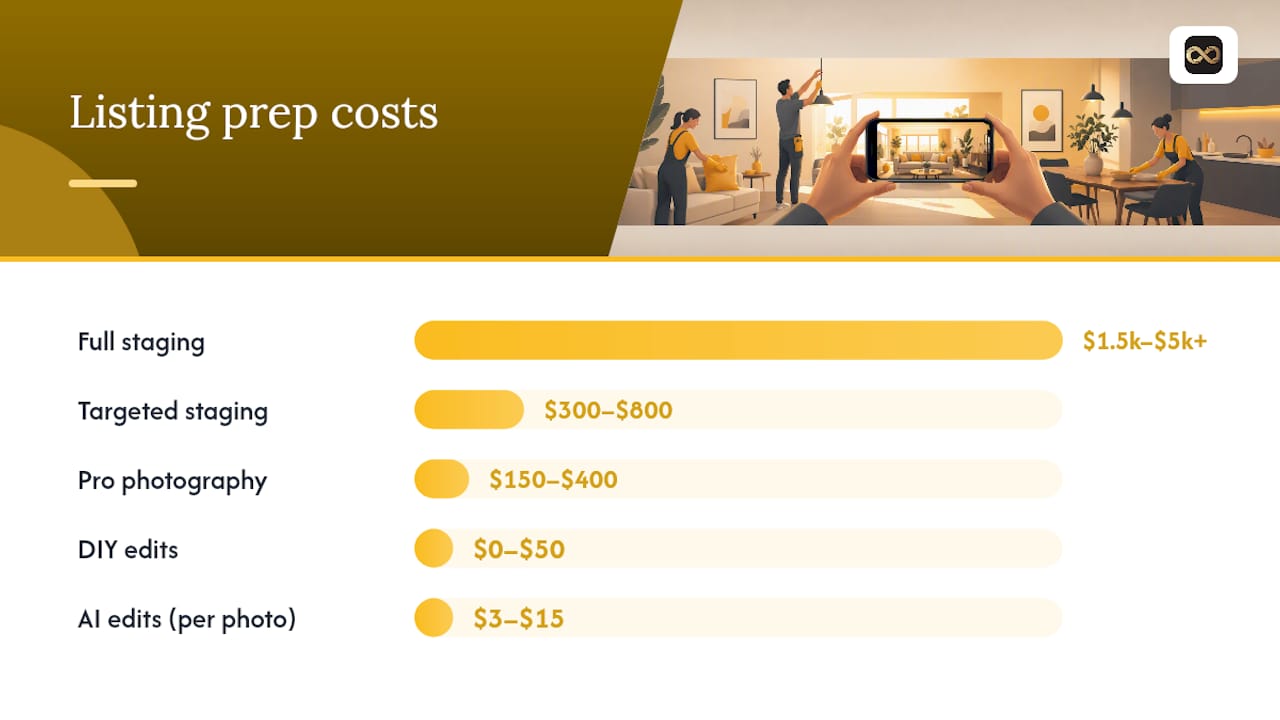
Small investments produce the fastest returns. Here is a realistic breakdown:
- DIY edits and declutter: $0–$50, same day. Clean, declutter, and use a free or low-cost editing tool. Free listing photo tools cover the options available without a paid subscription.
- AI-enhanced photo edits (per photo): $3–$15 per image depending on the service and edit complexity, with same-day or next-day turnaround. This is the highest ROI spend for most listings.
- Targeted staging (key rooms only): $300–$800 for a one-day staging consultation focused on the rooms that appear in the first three photos.
- Full professional staging: $1,500–$5,000+ depending on home size and market. Justified for higher-priced homes where days on market carry significant carrying costs.
- Professional photography: $150–$400 for a standard residential shoot in most U.S. markets.
The ROI case for photo investment is strong. Staged listings spend roughly 73% less time on the market compared with similar non-staged homes, according to industry reporting. This translates directly to reduced carrying costs and a stronger negotiating position. For a home priced at $500,000, a single extra month on market can cost more than the entire staging and photography budget combined. For sellers who want to skip traditional staging, alternatives that still support a fast sale are worth reviewing alongside your agent's recommendation.
A simple decision rule: spend on photo edits and targeted staging for every listing. Add full staging only when the home is vacant, the price point is above your market's median, or the listing has been sitting without offers.
How do you measure whether your first-impression fixes actually worked?
Track these metrics before and after any change to your hero image, photo order, or staging:
| Metric | What it tells you | Target signal |
|---|---|---|
| Click-through rate (CTR) | Share of searchers who click your listing after seeing the thumbnail | Increase after hero-image swap |
| Saves / shortlists | Buyers who bookmark the listing for later | Rising saves indicate stronger emotional pull |
| Showing requests | Direct requests generated per week on market | More requests per week after photo update |
| Days on market | Total time from list to contract | Shorter after staging and photo improvements |
| Offer strength | First offer as a percentage of list price | Higher offers correlate with stronger first impressions |
A simple A/B test for hero images works like this: list the property, note your CTR and showing requests over the first week. Swap the hero image for the second week and compare the same metrics. Platforms like Zillow and Realtor.com show view counts and save counts in agent dashboards, giving you real data without any technical setup. Run the test for at least one to two weeks, or until you have a meaningful difference in click or showing volume. Markets with lower traffic need longer windows to produce reliable signals.
Zillow's hero-image research demonstrates that engineering-grade improvements to hero-image selection are possible at scale. For individual agents, the same principle applies at a smaller scale: treat your hero image as a testable variable, not a fixed decision.
How a focused photo workflow improves clicks and showings
A focused workflow combining staging, smartphone capture, and same-day AI edits consistently reduces time-to-first-showing and increases click-throughs for listings that previously used unedited phone photos.
The workflow looks like this:
- Prep: declutter all rooms, complete curb-appeal fixes, and neutralize countertops and surfaces
- Shoot: capture with a smartphone using natural light, horizontal orientation, and a stable grip or tripod
- Upload: send photos to an AI editing service the same day as the shoot
- Edit: receive corrected images with exposure balancing, color correction, lens distortion fixes, window pulls, and bright-room edits
- Select hero: choose the strongest edited image for the hero position based on thumbnail performance
- Publish: upload MLS-ready files directly to your listing platform
Proofe handles steps 3 through 5 in this workflow. The service accepts smartphone photos, applies AI-enhanced edits including exposure balancing, color correction, lens distortion correction, sky replacement, window pulls, and object removal, and delivers MLS-ready files the same day. The first five photos are free, so you can test the output on a real listing before committing to a full order. Virtual staging is also available for vacant properties.
One ethical note: every edit should improve clarity and accurate representation of the space. The goal is to show the home at its best, not to misrepresent it.
The online hero image is the decision that matters most
Most agents spend their preparation time on the in-person showing and underinvest in the online presentation that determines whether that showing ever happens. The evidence points in one direction: the hero image is the decisive variable. It controls clicks, sets buyer attitude, and frames every subsequent judgment about price and condition.
The practical move is to treat the hero image as a testable marketing asset. Swap it, measure CTR and showing requests, and let the data tell you what your local buyers respond to. Analytics are available in every major listing platform's agent dashboard. Use them.
Your listing photos, professionally edited the same day.
Proofe gives agents and sellers a faster path to professional-quality listing photos without booking a photographer or waiting days for edits. You shoot with your smartphone, upload your photos, and receive AI-enhanced, MLS-ready files the same day. Edits include exposure balancing, color correction, lens distortion fixes, sky replacement, window pulls, and object removal.
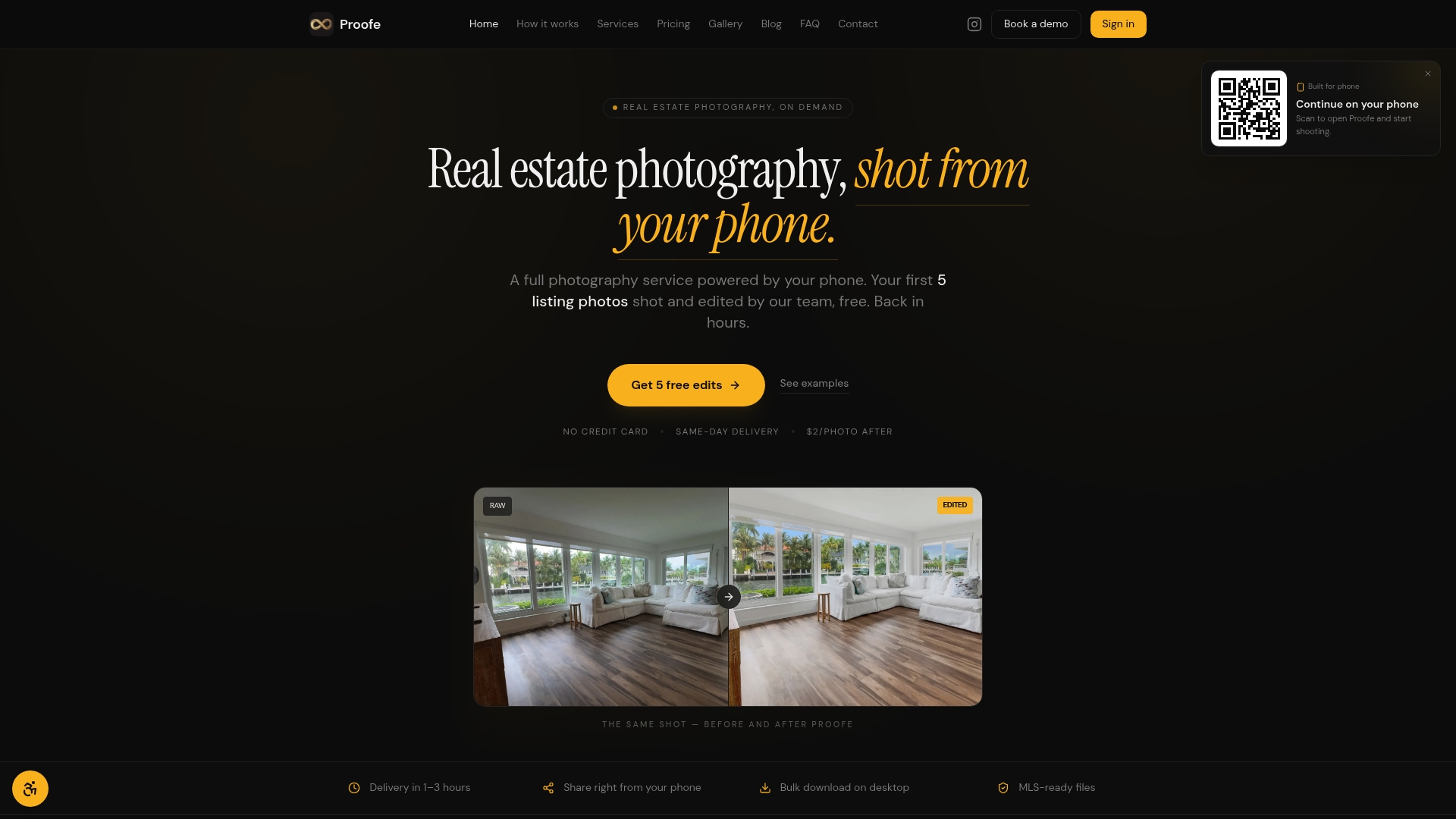
The first five photos are free, so you can see the difference on a real listing before placing a full order. For teams and brokerages, volume pricing is available. Property managers and Airbnb hosts can use the same workflow to refresh seasonal photos quickly, without scheduling a full shoot. Start your first order at Proofe and have edited photos ready before your listing goes live.
Sources
These are the primary sources cited throughout this guide. Use them when preparing market-specific tests or presenting the evidence to clients.
- Estimating and Exploiting the Impact of Photo Layout: A Structural Approach
- Frontiers in Psychology — preregistered experimental study on first impressions and updating
- The First Impression Bias - The Decision Lab
- What makes a photo click? Selecting hero images with deep learning — Zillow Tech Hub (Medium)
- The Psychology of Online Home Shopping: How Buyers Really Browse Listings - Lumatrix Media
- Journal article on signals in housing listings — Springer
- Frontiers in Psychology — review of first impressions